



General
Agentic Commerce for Magento and Adobe Commerce: What You Can Use Today
Meghna Vinod|Nov 10, 2026|Read 8 Min



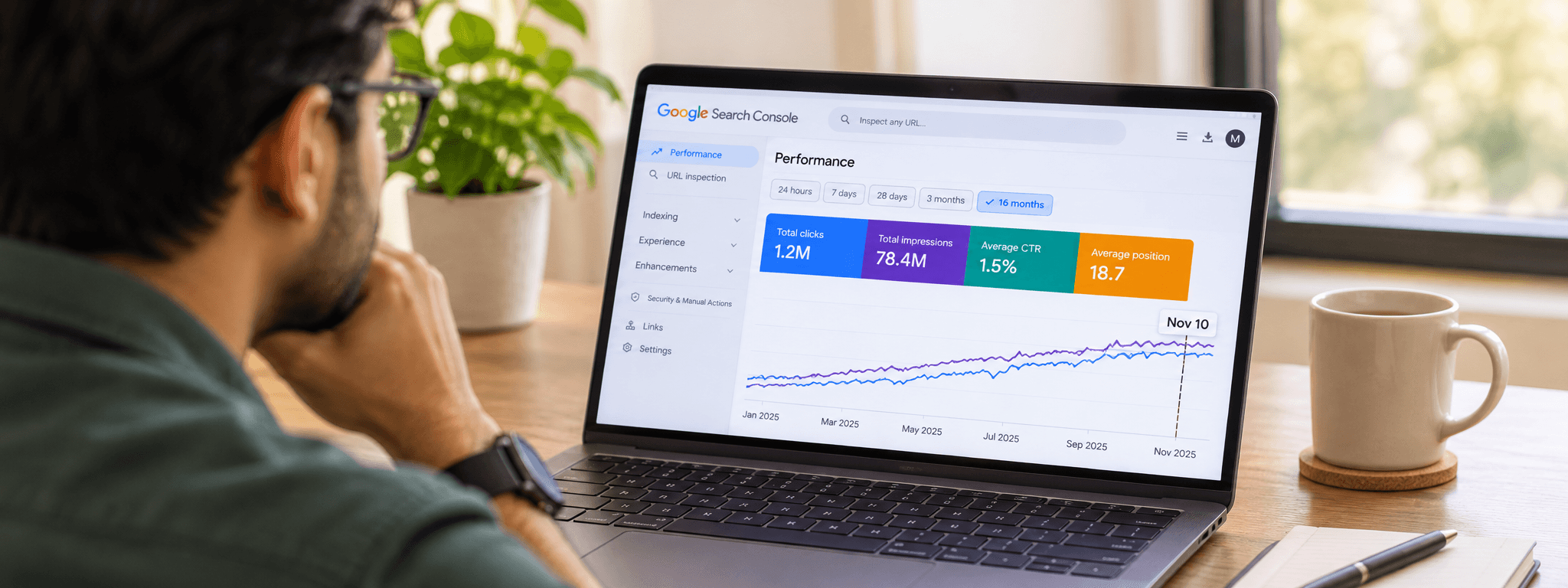
Google started rolling out a core update on November 10. Two weeks, give or take, so it should wrap up around November 24. Thanksgiving is on the 26th.
Bad timing if you run a store. And if you're like most of the owners we talk to, you've already opened Search Console a dozen times since yesterday. Don't read too much into it yet. Nobody knows who's winning, and Google hasn't said. What you can do is get your house in order now and check the results properly later. That's what this post is about, along with some numbers from our own client work. Not all of them flattering.
Not much. Google describes it as "a regular update designed to better surface relevant, satisfying content for searchers from all types of sites." It's global and covers every language. It's also the third core update this year, and the status dashboard now lists eight ranking updates for 2026.
No checklist came with it, and there's no early data on winners or losers. That's normal for a core update. Google changes how it weighs a lot of signals at once, which means a page can move without anything being wrong with it. On a store, the pages that tend to get hurt are thin product pages, near duplicates, and URLs Google can't get to or doesn't bother indexing.
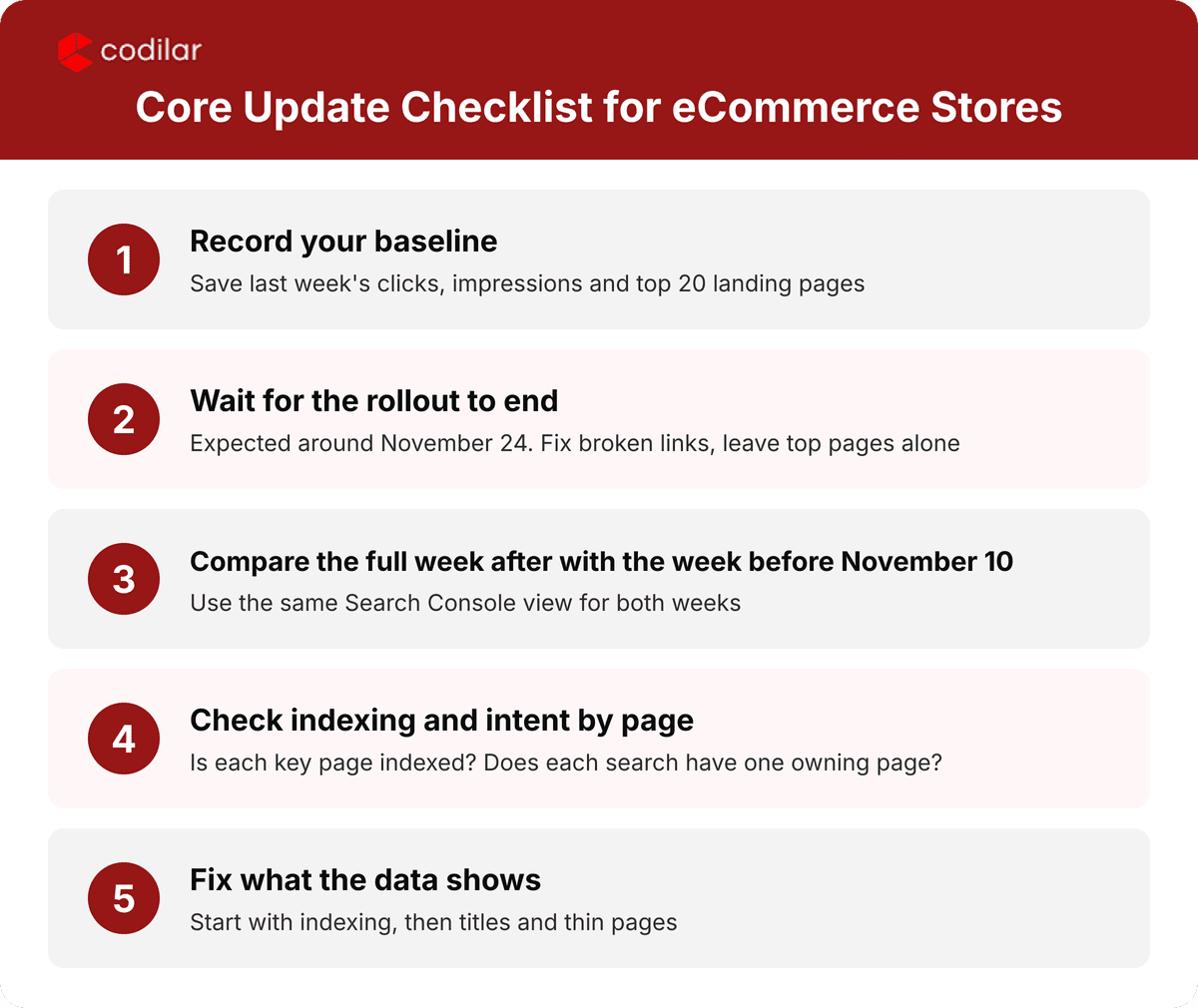
Google's own advice: wait until it's done, then compare the first full week afterward with the week before November 10. If it finishes around the 24th, that's early December data. Not Thanksgiving week.
So for now, leave your best pages alone. Change a page mid-rollout, watch it drop, and you'll never know whether the update did it or you did. Broken links, redirects and sitemap errors are different. Fix those whenever. That's housekeeping.
Two things are worth doing today. Write down last week's clicks, impressions and your top 20 landing pages, because you'll want that baseline in December. And keep your holiday code freeze. Large template changes during a core update make the numbers impossible to read. Our holiday readiness guide has the freeze window.
Lately you’ll see people saying keywords are dead. Chris Green of Torque Partnership answered that in Search Engine Journal on November 10, and he didn’t go that far. His view is that you keep the keyword research and build a system around it. Each search gets a page that owns it, and related searches go into the same group. For every page you follow a few searches and AI prompts. When you report, you talk about business results and leave rank positions out of it.
We think he has a point, mostly because of what we see on eCommerce stores. Say you sell office chairs. A search for “ergonomic office chair” probably belongs to a category page. “Gas lift for [model]” belongs to a product page, and “how to adjust lumbar support” fits a guide. If two pages compete for the same search, Google chooses one of them, and it isn’t always the one you’d have picked. That’s why our first question in any audit is whether every search that matters has exactly one page that owns it.
When a store owner tells us their rankings have slipped, the cause is often indexing. If Google hasn't indexed a page, it can't rank, no matter how well the page is written.
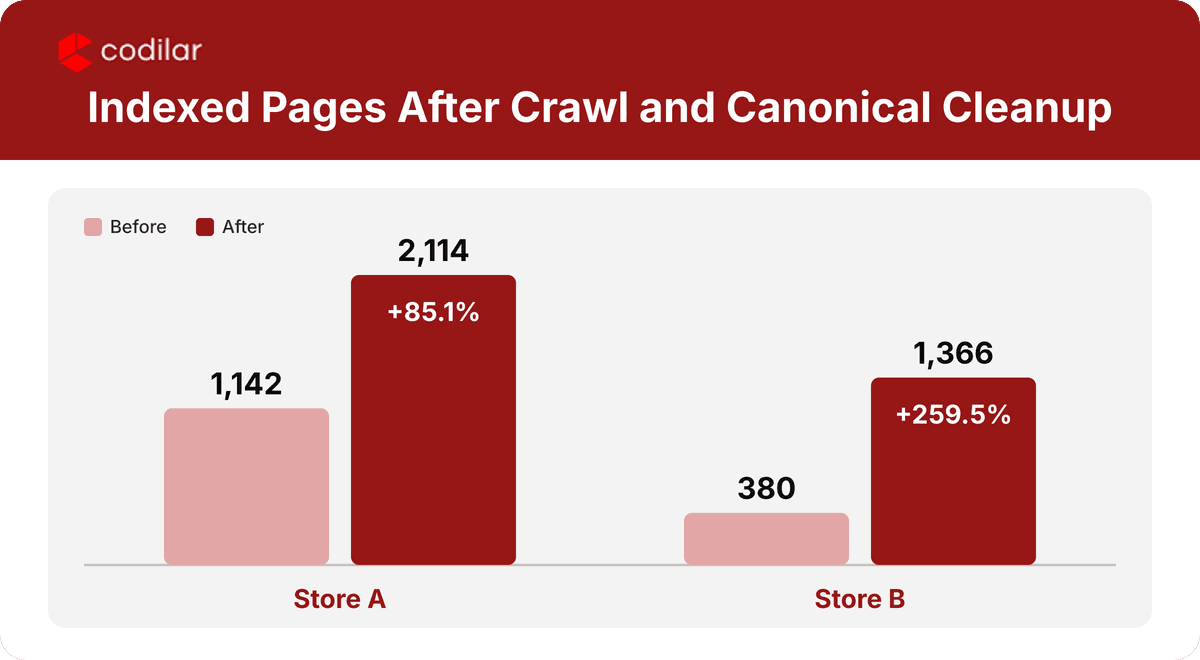
A recent project shows what we mean. JPW, a U.S. industrial machinery group, runs six Adobe Commerce stores, and each one has a large catalog of products and parts. We started with crawling and indexing. That meant adding canonical tags to filter URLs, setting noindex rules on utility pages, fixing the sitemap and robots.txt, and validating the schema. We also wrote up a fix list for JPW's developers.
The figures below are from Google Search Console. Clicks and impressions compare the last three months with the three before, and the indexing numbers compare the latest reading with an earlier one.
On the first store, indexed pages went from 1,142 to 2,114, up 85%, while not-indexed pages fell from 4,415 to 2,682. Clicks rose 16.7% and impressions 26.4%. On the second, indexed pages went from 380 to 1,366, and not-indexed pages dropped from 9,149 to 3,866. Impressions rose 18.8%, and average position improved from 8.7 to 8.0.
"Half the 'ranking drops' people send us are really pages Google never indexed. Look at that before you touch a single title tag."❞

Mohammad Mujassam | VP Commerce & DX Practice
13+ Years of Experience
Indexing isn't a one-month job, so we keep tracking it every month and fixing what turns up.
If you're planning a move, sort out redirects and the sitemap before launch. Our guide to moving from Magento Open Source to Adobe Commerce covers it.
The Chrome team also put out Modern Web Guidance 1.0 this week. It's a free set of instructions for AI coding agents, pointing them at current browser features. In Google's nightly test on November 8, agents using it passed 88% of automated checks. Without it, 56%. The checks look at loading speed (LCP), responsiveness (INP) and accessibility.
Should you care? A bit. If your developers lean on AI coding tools, this could cut down on the slow or inaccessible code those tools sometimes produce. Just don't treat it as a ranking lever. Google hasn't said it is one, and accessibility researcher Adrian Roselli found gaps in the early preview. Think of it as a quality check. Fast, accessible pages are better for shoppers anyway.
For a store, that means product and category templates that load quickly on a phone, images that don't push the layout around, and a cart that reacts the moment someone taps it.
People ask AI tools what to buy now. A store can lose sales without losing a single ranking. That's why we check how often a store is mentioned and cited in AI answers, using Semrush's AI visibility data, next to the Search Console numbers.
On the same project, one store scored 61 out of 100 and another scored 49. A smaller catalog scored 31 and barely shows up. Citations grew on two stores after we fixed structured data and added an llms.txt file, though cited pages on some stores dipped from month to month. The data is noisy, so we read three-month trends and ignore single readings.
If you're on Adobe Commerce, our GEO and AEO audit for Adobe Commerce stores goes deeper.
Codilar's SEO work sits under our digital marketing services, and it's built around commerce platforms, not brochure sites. We spend our days on Adobe Commerce and Shopify, so whoever reads your Search Console data also knows your templates, your filters and your cart.
Most engagements start with an audit: crawl, indexing, schema, speed, AI visibility. We sort the fixes, hand developers clear specs, and report monthly against measures we agree on up front, like indexed product pages, clicks and AI citations. And if you'd like the technical fixes done by the same people, our Adobe Commerce experts can take that on.
Want to read more first? Try our piece on Shopify SEO standards or the simple eCommerce SEO guide for beginners.
A core update isn’t something you can steer, but you do get a say in what your store looks like when it’s over. Write down your numbers today. Sort out any indexing and duplicate page problems you already know about, and make sure each search that matters has one page that owns it. Then wait until early December to look at the results, when the data has had time to settle.
If you would rather not work through this alone, our SEO team can do it with you. We will check crawl, indexing, schema, speed and AI visibility, sort the fixes by what matters most, and give your developers clear specs. You will know what changed, what to fix first and what to leave alone.
Book an eCommerce SEO audit with Codilar and we will start with your Search Console data.
It began on November 10, 2026 and can take up to two weeks. Google says to compare the first full week after it ends with the week before November 10. That's the same comparison our SEO team uses in client reports.
Not your top earners. If you edit them now, you won't be able to tell what caused any change. Fixing broken links and sitemap errors is fine, and Codilar's team can do that safely while the rollout runs.
Yes. They just work better as part of a plan: one page per search, related searches grouped together, results tracked by business outcome. We build that keyword to page map for every store we audit, product pages first.
Google hasn't said so. It's a toolkit that helps AI coding agents write faster, more accessible code. If your developers use those tools, it may help with speed and accessibility, and ours can check the results against your Core Web Vitals.
Expect the first signs within a few weeks, mostly in Search Console, where fixed pages start getting indexed. Rankings and clicks usually follow over the next few months, and sales come after that. A site migration or a big template change can slow things down for a while. When we take on an eCommerce SEO project at Codilar, we agree on what we’ll measure and when before any work starts.

Get tailored technology solutions to scale your retail business online
Request A Quote

Stay ahead with insights, trends, and brand success stories from the world of Digital Commerce.


With the world's leading digital commerce agency.