



Shopify
Shopify Plus EDI Integration: A Guide for US B2B Suppliers
Anusree V Anand|Nov 16, 2026|Read 8 Min




If your custom app or integration still calls /admin/api/.../products.json, the question is no longer whether to move, but in what order. Shopify marked the REST Admin API as legacy on October 1, 2024, and its product endpoints already struggle with large catalogs. Many teams only notice when a sync fails on a product with many variants, or when a newer Shopify capability appears only in GraphQL.
Replacing all REST API calls with GraphQL Admin API calls at once can cause disruptions. Instead, a Shopify GraphQL Admin API migration should be carried out gradually, starting with the areas that need the most attention and testing each change along the way.
Shopify approaches GraphQL as its primary API and directs new feature work there. New public apps were required to use it exclusively from April 1, 2025. However, many existing apps still use REST, and many custom integrations continue to run on it.
The migration is critical for stores with high-variant products, as the REST /products and /variants endpoints cannot return more than 100 variants per product or write to products with more than 100 variants. A few high-variant items can break a REST sync without any code changes on your side.
A Shopify GraphQL migration is easier to schedule before a catalog outgrows these limits. Shopify releases a new version every quarter, and each version is supported for at least 12 months. If your app targets an unsupported one, Shopify falls forward to the oldest supported version, and behavior can shift without a deploy.
Every Shopify GraphQL Admin API migration should begin with an audit. Search your code and logs to identify all the REST API calls your app makes. Group these calls based on what they manage, such as products, orders, or customers. Identify which calls are likely to fail and their potential impact. Prioritize the API calls with the highest risk and business impact.
Decide which GraphQL operations should replace the REST API calls. To retrieve large amounts of product data across multiple pages, bulk operations are recommended. productSet fits when an ERP or PIM system manages product information and needs to sync the complete product data with Shopify, while individual mutations can be used for small edits. The REST API returns entire resources, while the Shopify Admin GraphQL API returns only the selected fields.
For an overview of Admin, Storefront, and webhook APIs, refer Codilar’s guide to Shopify API integrations.
In the GraphQL Admin API, products are designed in three levels, including the product, its options, and variants. Each tier has specific operations for creating or updating it. The table shows how common tasks translate.
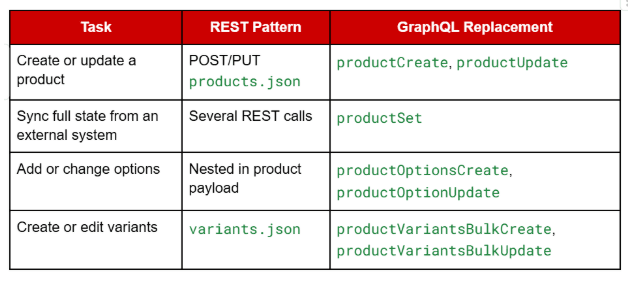
Choosing the right operation depends on which system manages the product data. If Shopify is the source of truth, targeted mutations can update only the details that need to be changed. However, if an ERP or PIM system manages the product data, productSet is preferred because it sets the complete desired state in one operation, and it replaces list fields such as options and variants. This means a variant missing from your payload can disappear.
GraphQL variant bulk mutations can accept up to 2,048 variants in one call. A single product query can also retrieve up to 2,048 variants. However, when retrieving product lists across multiple products, pagination is used, with up to 250 items per page.
Verify the userErrors field in every mutation response. GraphQL returns HTTP 200 for business-logic failures, so a status check alone will report success on a rejected write.
REST exports fetch 250 records, wait for the response, and then fetch the next page. This process repeats until all records are fetched. In a Shopify GraphQL Admin API migration, bulk operations make this easier because Shopify runs the query in the background and returns a JSONL file as output, where the file contains one JSON object per line.
graphql
mutation {
bulkOperationRunQuery(query: """
{ products { edges { node { id title } } } }
""") {
bulkOperation { id status }
userErrors { field message }
}
}
There are three important constraints to consider when designing a bulk query. A bulk query that is still running after 10 days is stopped and marked as failed, so the data requested needs to be trimmed or split into smaller queries. The groupObjects option slows the operation and raises the timeout risk, so parsing parent IDs from the JSONL is safer. Bulk operations also exist only in the Shopify GraphQL Admin API and not in the Storefront API.
Before API version 2026-01, an app could run only one bulk operation of each type per store at a time, whereas now up to five bulk queries can run simultaneously. Bulk operation details can be fetched through bulkOperation(id:) and bulkOperations, where the first returns information about a specific operation and the second lists, filters, and paginates all bulk operations. Both replace the deprecated currentBulkOperation query. For large imports, bulkOperationRunMutation accepts an uploaded JSONL file containing multiple records and runs the specified mutation once for each line, which beats thousands of individual calls.
To receive timely updates such as product updates or bulk operation completion, subscriptions can be created using the webhookSubscriptionCreate mutation. Apps built with Shopify CLI can also define subscriptions in the shopify.app.toml configuration file. However, the webhookSubscriptions query lists only shop-scoped ones, not those defined in the configuration file.
For bulk jobs, repeated checking for updates is wasteful, so subscribing to bulk_operations/finish is the better option. This enables receiving a notification when the operation is completed, failed, or canceled. It also includes the admin GraphQL API ID, which can be used to fetch the download URL for the results.
For reliable notifications, a webhook receiver should follow these four steps.
Shopify introduced Next Generation Events as the successor to classic webhooks in API version 2026-10. Configure these events in shopify.app.toml by defining what triggers the event, what data it sends, and conditions to be satisfied, and Shopify CLI 4.83 or later is required. Classic webhooks keep working alongside Events, so migration can be taken gradually and classic webhooks can continue to be used for events that Next Generation Events do not yet support.
Test new GraphQL queries on a development store and compare with REST API outputs on sample records and ensure they work appropriately. Test how the integration handles products with many variants and multiple webhook events. Start the Shopify GraphQL Admin API Migration one part at a time, and keep the REST path until each part has survived a full business cycle.
Migration should be carried out in small, manageable steps such as product updates, replacing slow data exports with bulk operations, and monitoring query costs from the beginning. In short, list all the existing REST API calls and identify GraphQL replacements and risk levels. If you want help with GraphQL migration, contact Codilar to plan the migration in phases.
Yes, both API calls access the same Shopify store data. Migrate one part of the integration at a time and use only one API to update a particular product or record to avoid conflicting changes.
It replaces the existing product options and variants with the information sent in the request. Any existing variant missing from the submitted data can be removed from Shopify. Treat every productSet call as a complete update of the product's desired information and test it on a development store with a realistic product catalogue before using it for a live data sync.
bulk_operations/finish webhook is preferred when a bulk operation is running to know when it has completed, failed, or was cancelled, and the result is retrieved with the GraphQL API ID. Polling bulkOperation(id:) is another option if the webhook is not used. However, the result file should be collected within seven days.
Read extensions.cost in each response to view the requested cost, actual cost, and current throttle status. The Shopify-GraphQL-Cost-Debug=1 header provides a cost breakdown for each field, making it easier to identify expensive fields. This information helps developers adjust the number of records requested and manage API usage.
Custom apps with products above 100 variants had to move off the deprecated product APIs by April 2025. Shopify’s documentation does not currently announce a shutdown date for existing apps, and new work should start in GraphQL.

Get tailored technology solutions to scale your retail business online
Request A Quote

Stay ahead with insights, trends, and brand success stories from the world of Digital Commerce.


With the world's leading digital commerce agency.