



Shopify Plus
From SAP Hybris to Shopify Plus: The Migration Guide Every Enterprise Needs Before July 2026
Nikki Kumari|Jul 30, 2026|Read 6 Min




Brands in the United States move from Salesforce Commerce Cloud to Shopify Plus when costs or ticket backlogs become overwhelming to handle. Salesforce Commerce Cloud, which many U.S. teams still call “Demandware,” charges based on GMV (according to Salesforce).
This means the bill often rises each time your sales hit a milestone. Meanwhile, a merchandiser who wants to reorder a collection must open a ticket and find a developer who knows cartridges. On Shopify Plus, merchandisers can make the change themselves, thus saving time.
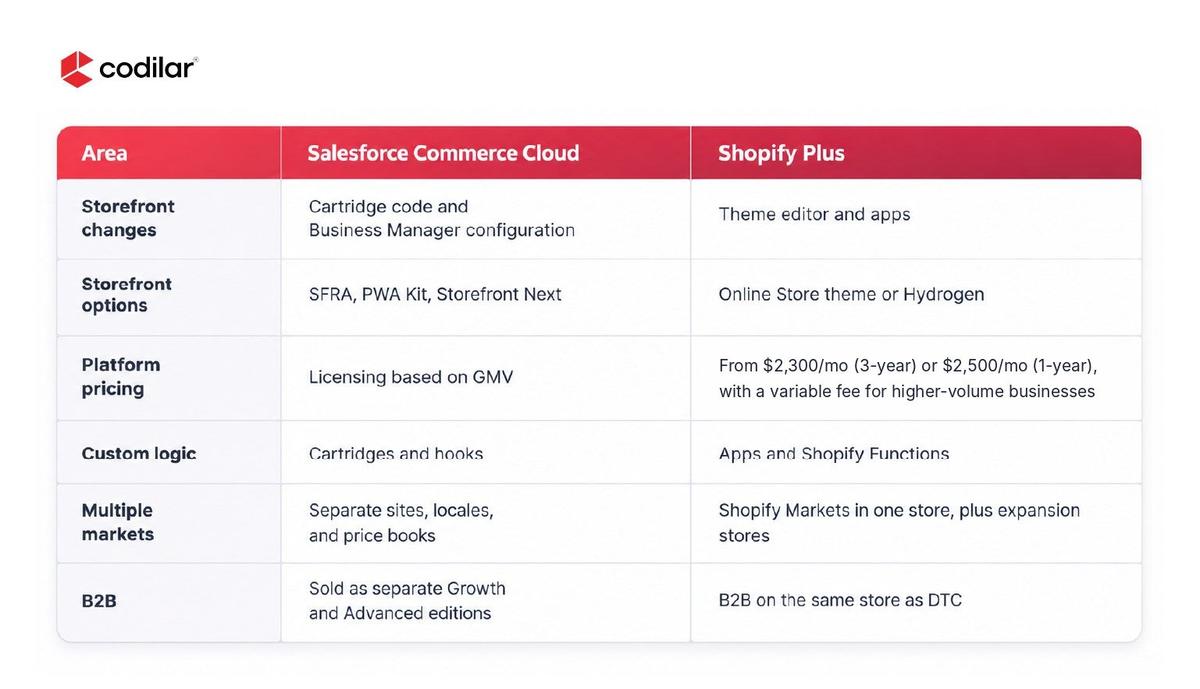
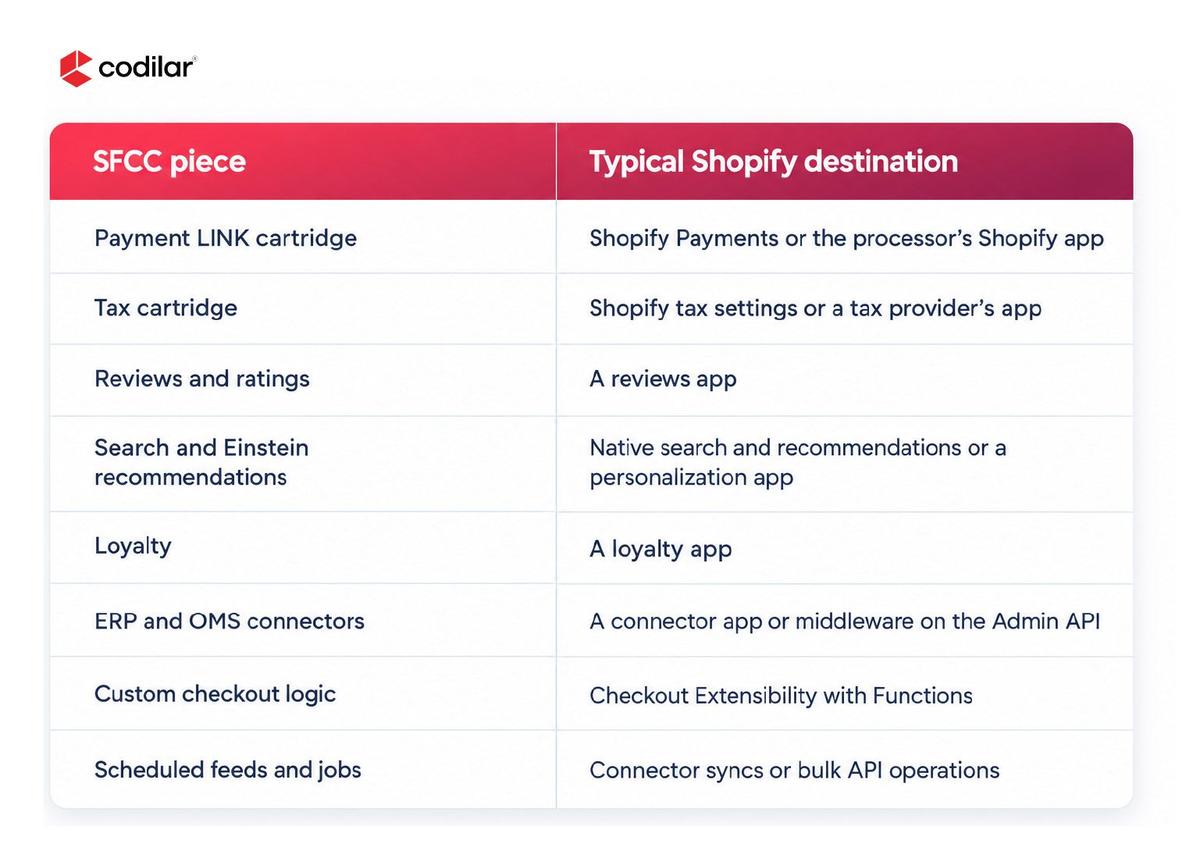
Since cartridge codes cannot be migrated directly to Shopify Plus, they must be recreated from scratch. At Codilar, a Shopify Plus partner, our experts begin this migration by identifying all cartridge codes on the way, from LINK cartridges from different partners to custom ones, and moving the code safely.
Additionally, each record describes the functionality of the cartridge and is categorized into one of these three buckets:
This allows us to understand precisely what we need to do.
Salesforce models a product as a master with variants and groups related items into variation groups. Shopify uses a single product with options and variants, so each SFCC structure gets its own mapping decision.
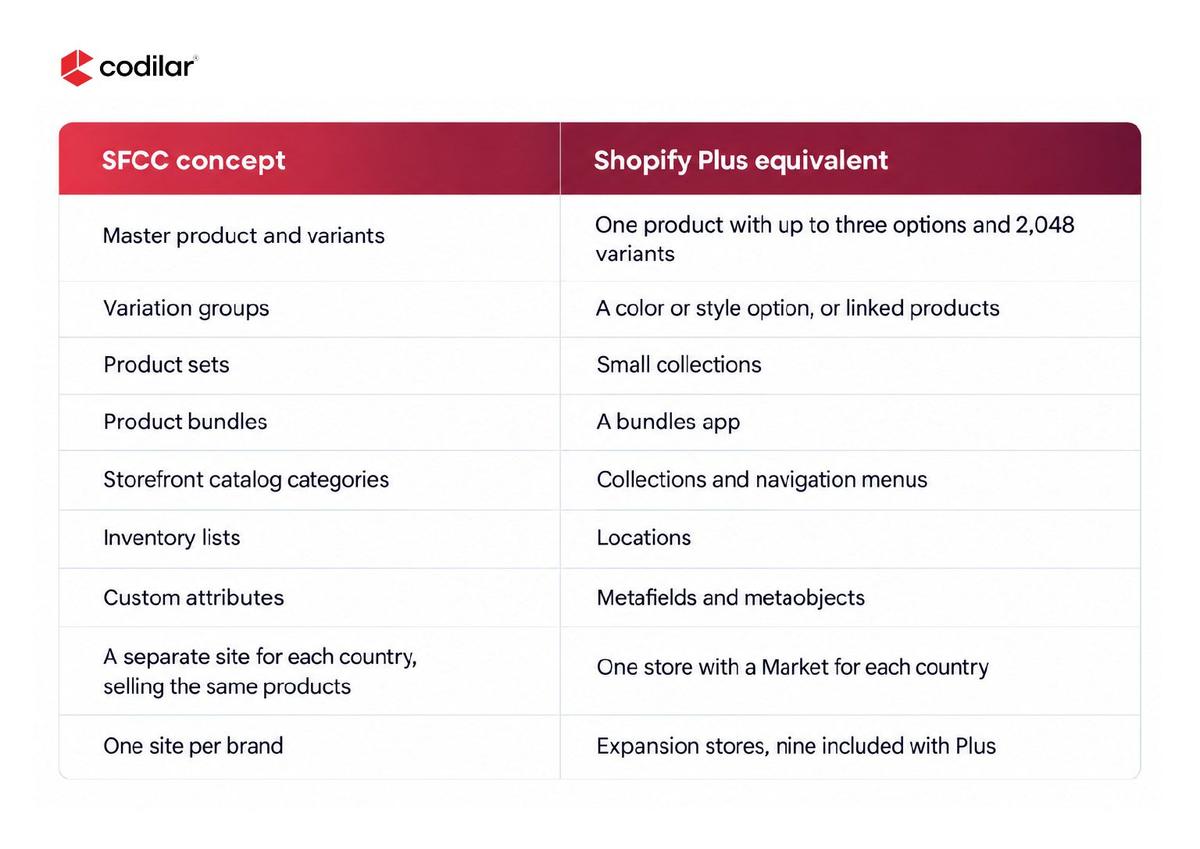
A master with more than three variation attributes exceeds Shopify’s three-option limit. Those products get restructured, for example as separate products grouped with the Combined Listings app on Plus.
Deep category trees usually get flattened into fewer collection levels. Sorting changes too. SFCC sorting rules can blend several attributes with weights, while a Shopify collection applies one sort option at a time, such as best-selling or price.
SFRA or PWA Kit Storefront Migration to Shopify. Just like cartridge code, SFRA and PWA Kit storefront code cannot be migrated, thus the storefront will be rebuilt on Shopify using either of these two methods.
A Shopify theme. The best option for most US brands. The SFRA templates will be turned into theme sections and blocks which can then be edited within the theme editor. The Page Designer pages and content assets are rebuilt as sections while structured content is rebuilt as metaobjects.
Hydrogen. For teams that are using PWA Kit but want to remain headless, Hydrogen on Oxygen can be used. It restores the front-end codebase that needs to be maintained.
Salesforce’s documentation now points new builds to Storefront Next or PWA Kit. A team weighing another Salesforce rebuild can price it against the Shopify route first.
Promotions from Salesforce Commerce Cloud are migrated as Shopify Functions. This is a method of providing custom discounts using Shopify. The previous way of doing so via Plus checkout on Shopify Scripts is no longer available from 30th June 2026, as mentioned in the Shopify Developer Changelog.
Campaigns in Salesforce include promotions. The promotions can be qualified by coupons and customer groups. There is only one currency used in the price book. The volume price table includes discounted prices for higher volumes. The coupon codes are maintained as is.
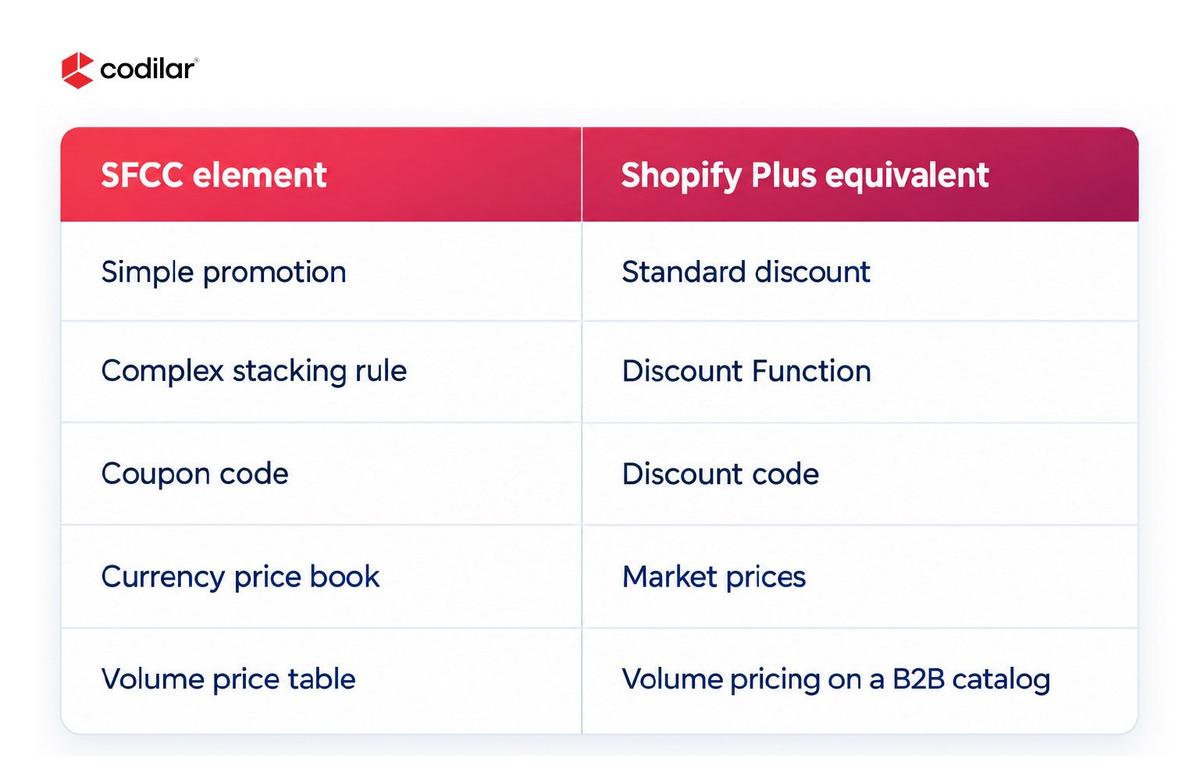
The restrictions set by Shopify affect the process of the rebuild. As per Shopify’s Help Center, there is a limit on how many active discounts can be used on a store at any point in time. A maximum of 25 discounts can be used, and discounts made using an application are counted under the limit. Stacking can only be done on Shopify Plus.
Profiles, addresses, opt-in status, and custom attributes all move. Shopify’s customer CSV has a fixed set of columns, so extra attributes such as birth date need metafields or an app. Customer groups become tags and segments, or B2B companies for wholesale buyers.
Passwords do not migrate. Shopify states that passwords are encrypted outside Shopify, so a CSV import cannot carry them. New customer accounts sign in with a one-time code.
Single sign-on needs a plan. According to Shopify’s documentation, Multipass only works with legacy customer accounts. Brands that sign customers in from another system, such as a loyalty portal or a mobile app, should look at connecting an OIDC-compliant identity provider to new customer accounts.
Orders can be imported via the API. The admin CSV does not support importing orders, only products and customers. You can push your orders using the API or a migration app. You will need to push products, then customers, then orders. This will ensure that the orders are linked to the right products and customers. You will also want to import consents to ensure that the customers' email and SMS opt-ins are still there.
All SFCC URLs will have to change. SEO friendly URLs are constructed based on logic. A sample for product URL can be /shoes/sandals/red/water-sandal/12414.html and SFCC will use /products/ and /collections/.
Your 301 redirect mapping will be created based on your internal URL mapping, existing redirect maps and full crawling. All indexed URLs will be mapped to 1:1 redirect. Redirecting a large number of URLs to the homepage is just a waste of authority.
SFCC will perform the redirect only if the old URL returns a 404 on SFCC. URLs having query strings won’t redirect properly. Test your SFCC controller-style URLs on the live domain. Make sure that metadata and alt text remain the same as before. Upload the new sitemap to Google Search Console within an hour of going live.
Every new path you choose for Salesforce will come at the cost of another rebuild. In the case of Shopify Plus, you will be responsible for updates to your stores, and bespoke logic will be implemented in Functions and your custom applications. The migration process is simplified when data transfer and SEO activities take place simultaneously, and a cartridge audit is done prior to development.
Being certified Shopify Plus partner, Codilar offers services for migration throughout the whole process from the platform audit to post-launch monitoring. Contact our experts right away!
No, provided SEO is performed in parallel. You will need to export all indexed URLs, prepare a one-to-one 301 redirect file, and upload a sitemap within the first hour after launch. Check any query string URLs for redirecting properly. At Codilar, we provide the full lifecycle of migration services as SFCC migration partner, so the mapping of redirects starts with the audit, while ranking verification goes after go-live.
They are not migrated as code. You will have to list all cartridges, document their functionality, and rebuild only those that you need. For most of the functionality, there are corresponding Shopify features and apps in the App Store. The rest can be implemented as a Function or as a custom app.
No, they are not. Passwords are encrypted outside of Shopify; hence, each customer will have to log in using either a one-time code or a password reset. A pre-go-live notification email will reduce the support load significantly.
It depends on sites, integrations, and storefront approach. According to Shopify, a full replatform that includes the front-end build and integrations usually takes three to six months. Complex integrations add time.

Get tailored technology solutions to scale your retail business online
Request A Quote

Stay ahead with insights, trends, and brand success stories from the world of Digital Commerce.


With the world's leading digital commerce agency.