



Adobe
Adobe Commerce B2B Development for US Industrial Distributors and Manufacturers
Aakash Ashok|Nov 10, 2026|Read 6 Min




Adobe's October 30, 2026 deadline for third-party software on Adobe Commerce Cloud has passed. Black Friday arrives on November 27. Your dependency upgrade and surge capacity request now compete for the same days, and both go through Adobe Support.
Short answer: upgrade first. File both requests today, but let Adobe's downtime window decide your surge dates.
Adobe's enforcement page lists no code freeze and no peak-season exception. It offers one concession: ask your account team or Adobe Support for a short extension as soon as possible. Every other sequencing decision belongs to you.
Two questions place you on this grid.
Has your dependency upgrade finished? Did you file your surge capacity request?
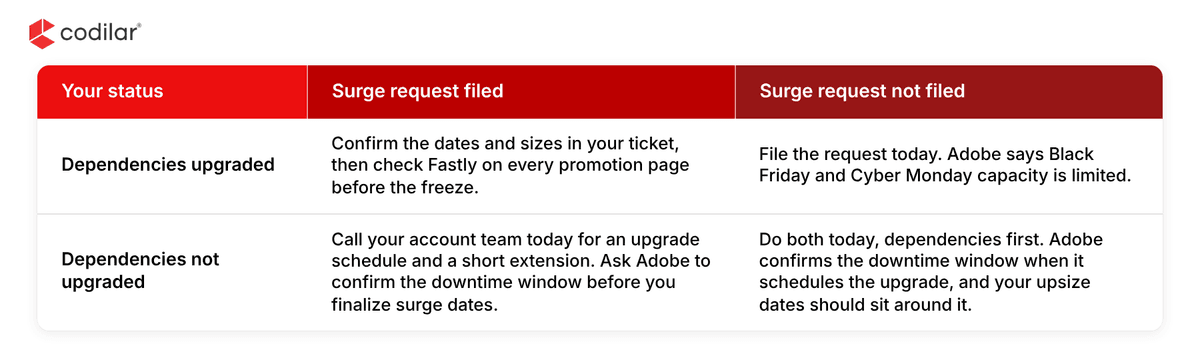
Unsure which row you are in? Open the Cloud Console and pick your project and environment. Go to the Containers tab and click each service. The running version shows there.
Adobe's Security Enforcement Policy applies to Adobe Commerce on Cloud versions 2.4.4 through 2.4.9. It does not apply to Adobe Commerce as a Cloud Service or to on-premises stores. The requirements cover every environment you run, production included.
Adobe describes a ladder for environments that miss these dates. Admin access may be suspended for all users on the affected environment while the storefront stays online. Adobe may then suspend inbound traffic, which takes the storefront offline. Adobe may also shut down a non-compliant environment, which permanently deletes all data and assets and cannot be undone. The page states there is no separate notice period.
Adobe asks you to open the upgrade ticket at least 30 days before the enforcement date. A ticket opened today is late against that guidance, so ask for the short extension on the same call. Once Adobe schedules the work, it confirms the expected downtime window with you.
Test in a non-production environment first. Adobe names checkout, search, cart, and any custom integrations as the minimum areas to validate. Adobe also notes that moving from Elasticsearch to OpenSearch, and Redis to Valkey, changes the software. Your custom code and extensions may need updates, along with your settings.
Variable names in Adobe's holiday guidance change with the software. On Commerce 2.4.9, Adobe does not support Redis as the L2 cache backend. The same applies to patch releases later than 2.4.5-p16, 2.4.6-p14, 2.4.7-p9, and 2.4.8-p4. Ask your developers which side of that line your store sits on before they copy any tuning advice.
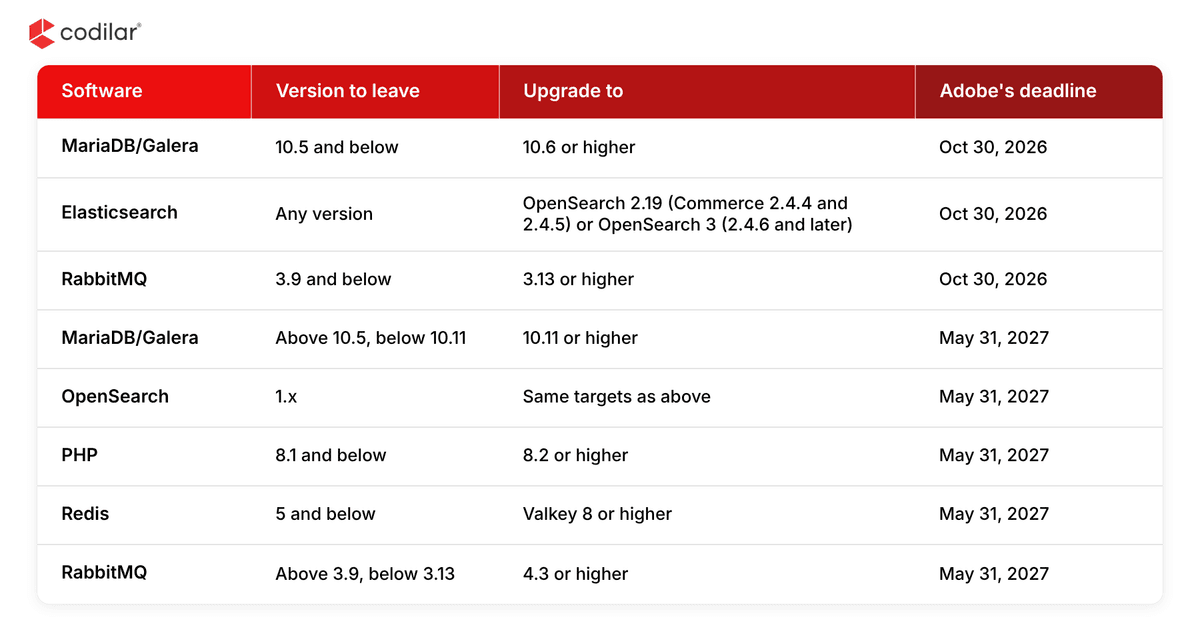
Adobe dates several upgrades for May 31, 2027, which puts them after peak:
One exception is a move to Commerce 2.4.9, or to the patch releases listed above. Adobe no longer supports Redis as the L2 cache backend there, so the Valkey change comes with the move.
Version enforcement follows. Stores on 2.4.4 and 2.4.5 face June 1, 2027, and stores on 2.4.6 and 2.4.7 face June 1, 2028. Adobe lists no version deadline for 2.4.8 and 2.4.9 at this time. To meet a version deadline, you can upgrade to the latest Commerce on Cloud version or migrate to Adobe Commerce as a Cloud Service. Adobe says its migration assessment tool and its bulk and incremental data migration tool carry no cost, and the data migration tool requires contacting Adobe Support.
Adobe also offers a scaled architecture to mitigate latency and large traffic spikes. It is available on Pro 48 clusters and larger, and it starts at six nodes. Talk to your account team before the next heavy-load period.
Adobe's pages give two lead times for the same request. The upsize procedure requires at least 48 business hours' notice for non-emergency requests, and it states that upsizes for promotional campaigns are not emergencies. The holiday readiness overview recommends requesting a temporary compute upsize at least 10 business days before a major promotion. Treat 48 business hours as the minimum and 10 business days as the target.
Adobe also says capacity during Black Friday and Cyber Monday is limited. Ten business days before Black Friday (November 27) is November 12 or 13. Whether or not you count Thanksgiving, the recommended lead time has already passed, so submit the request as soon as possible.
Adobe states that the added capacity uses your licensed overage capacity. An older Adobe article says the increase is deducted from your contracted Surge Days or vCPU days. Adobe's worked example multiplies vCPU size by days used: a size of 192 over 25 days equals 4,800 period vCPU. Your Customer Success Manager can share your resize history, so you can see what earlier upsizes consumed.
The Size End Date you submit sets when the cluster returns to its previous size. An automated system adjusts the instance size, and you may not receive a ticket notification when the change completes. Verify the new instance type in the Observation for Adobe Commerce tool.
Keep the emergency route for real emergencies. Adobe describes two cases: a site that is completely non-functional, and traffic far above expectations with severely degraded performance. Adobe provides New Relic alert policies for Pro and Starter production environments that track Apdex score and error rate. The holiday readiness overview sets an Apdex target of 0.85 or higher.
The minimum notice may already be out of reach. Adobe requires at least 48 business hours for a non-emergency upsize. Counted as eight-hour business days, that is six business days, which lands after Black Friday for a ticket filed this week. The Adobe pages behind this guide do not say how those hours are counted, so ask Adobe directly.
Every request Fastly answers is a request your cluster never serves, and a smaller upsize uses fewer vCPU days.
Campaign tracking parameters. Ad platforms add tracking strings to your URLs. Add those parameters to the Ignored URL Parameters list in the Fastly configuration in the Admin. Fastly then treats URLs that differ only by those parameters as equivalent, which improves the cache hit ratio.
The x-cache header on landing pages. Open every promotion landing page and read the x-cache response header. According to Adobe, the page is cacheable when later loads return a HIT, or a HIT and MISS pair. MISS twice in a row means the page is not caching and needs investigation.
GraphQL requests on headless storefronts. Fastly caches only GET requests where the query is part of the URL. A GET with the query in the body is not cached.
Origin shielding. Adobe states that origin shielding is off by default. Turn it on in the Fastly backend settings in the Admin and select the shield location nearest your origin data center. Fastly Image Optimization depends on it.
Image optimization. Fastly Image Optimization moves image resizing and format conversion to the edge. Setting Enable deep image optimization to Yes disables Commerce's built-in resizing for product images. Banners and content blocks from the CMS still use built-in resizing. To confirm it works, request a product image and check that x-cache returns HIT and that the fastly-io-info and fastly-stats headers are populated. Adobe also says the image URL should contain no /cache/ directory.
Adobe also recommends streaming Fastly logs into New Relic to spot abusive IP addresses and malicious requests against endpoints such as payment.
Adobe's holiday readiness overview says to finish all patching before code freeze, and it does not define when the freeze happens. The rule for what may ship during the freeze, and who approves it, is one you write yourself.
Finish before the freeze
Cyber Monday 2026 falls on November 30, three days after Black Friday. Adobe says capacity for both days is limited, so plan your Adobe Commerce Cloud peak traffic as one four-day event (November 27 to 30).
Keep the upgrade out of the window. Ask Adobe to place the dependency upgrade's downtime outside November 27 to 30, and sit your upsize dates around it.
Set the Size End Date after Cyber Monday ends. The date you submit decides when the cluster returns to its previous size, and an automated system makes the change, so you may get no ticket notification. Dates are in UTC. The end of Cyber Monday in Pacific time is 08:00 UTC on December 1, so for US shoppers set the end date after that, with a buffer for late orders and email traffic.
Re-check every Cyber Monday page. Deal pages and email landing pages are often new, so they have not been through your Black Friday checks. Read the x-cache header on each one, and add your email and ad platform tracking parameters to the Ignored URL Parameters list so Fastly serves them from cache.
Run the freeze through Cyber Monday. Adobe does not define when the code freeze ends, so write your own rule to cover December 1 as well. Keep the versioned rollback strategy and the 24x7 escalation contacts in place for all four days.
Watch the same alerts all weekend. Keep Adobe's managed New Relic alerts on Apdex and error rate active, with the Apdex target at 0.85 or higher. Your custom alerts for unusual traffic and slow GraphQL queries matter most on Cyber Monday, when promotion traffic arrives on top of Black Friday's.
Confirm the downsize, then plan the rest. After the end date, verify in the Observation for Adobe Commerce tool that the cluster returned to its previous size. Run a SWAT report, then schedule the upgrades Adobe dates for May 31, 2027.
Codilar is an Adobe Gold Solution Partner with 11+ years of experience in digital commerce and has delivered 500+ Adobe Commerce stores. Our Adobe Commerce team can compare your dependency status and Fastly setup with Adobe's guidance and help you prepare the surge request.
Adobe requires at least 48 business hours for a non-emergency upsize. Its holiday readiness overview recommends 10 business days before a major promotion. Black Friday and Cyber Monday capacity is limited, so file as early as you can.
Yes. File the ticket now and contact your account team and Adobe Support the same day to ask whether they can meet your dates. Promotional campaigns do not count as emergencies, so do not rely on the emergency route.
Adobe may suspend Admin access first and inbound traffic next. An environment that remains non-compliant can then be terminated and decommissioned. The page states no timetable for these steps, so ask your account team where your environment stands.
The enforcement page lists no peak-season or code freeze exception. It invites merchants who need a short extension to contact their account team or Adobe Support as soon as possible.
Yes. Cover Black Friday through Cyber Monday in one request, and set the end date after Cyber Monday ends in your main customer time zone, converted to UTC.

Get tailored technology solutions to scale your retail business online
Request A Quote

Stay ahead with insights, trends, and brand success stories from the world of Digital Commerce.


With the world's leading digital commerce agency.