



Adobe
PHP2Shell and Adobe Commerce: What Every Store Needs to Patch, Check and Protect
Aakash Ashok|Oct 23, 2026|Read 8 Min




An industrial buyer is planning to buy a large quantity of a certain product. He has a decent idea of what he wants to buy and how much he is willing to pay for it, but he gets a bit frustrated because he has to call the sales rep each time to check product and unit availability, negotiate the price and then place the order.
This is the issue with many eCommerce platforms used by manufacturers and distributors in the United States today. Someone on a team always has to directly communicate with the customer.
One way to improve the buyer journey for industrial buyers is through Adobe Commerce (formerly known as Magento). Adobe Commerce B2B development can provide the “rep-free” experience your clients want. This premium platform has native capabilities for managing your company hierarchy, customer-specific pricing, negotiation and approvals. Often, all you have to do from your end is integrate these capabilities with your ERP.
When it comes to industrial B2B, your average client is often a company with several buyers. They tend to negotiate prices most of the time, and need a manager’s approval before confirming any order.
A traditional eCommerce site generally cannot keep up with this. Adobe Commerce for manufacturers and distributors is specifically designed with such buyers in mind. This makes the entire ordering process easier.
Are you still on the fence about moving to Adobe Commerce?
Take a look at where the market is headed. The United States B2B eCommerce site sales reached around $2.297 trillion in 2024 and are forecast to reach $3.027 trillion by 2028 (According to eMarketer). This growth comes from buyers moving more of their ordering online and selecting a platform with company accounts and approval rules.
Think about how your largest customer buys. For example:
Adobe Commerce company accounts mirror that structure.
Imagine you have a distributor with 12 plants. The Head Office wants to have control over the conditions, whereas the plants want to purchase themselves. With Adobe Commerce, we have a parent company. The parent company has access to and can manage all accounts underneath. Each plant will have their own administrator, which will create their own buyers. Roles can be given to determine who can order and who can just request quotes.
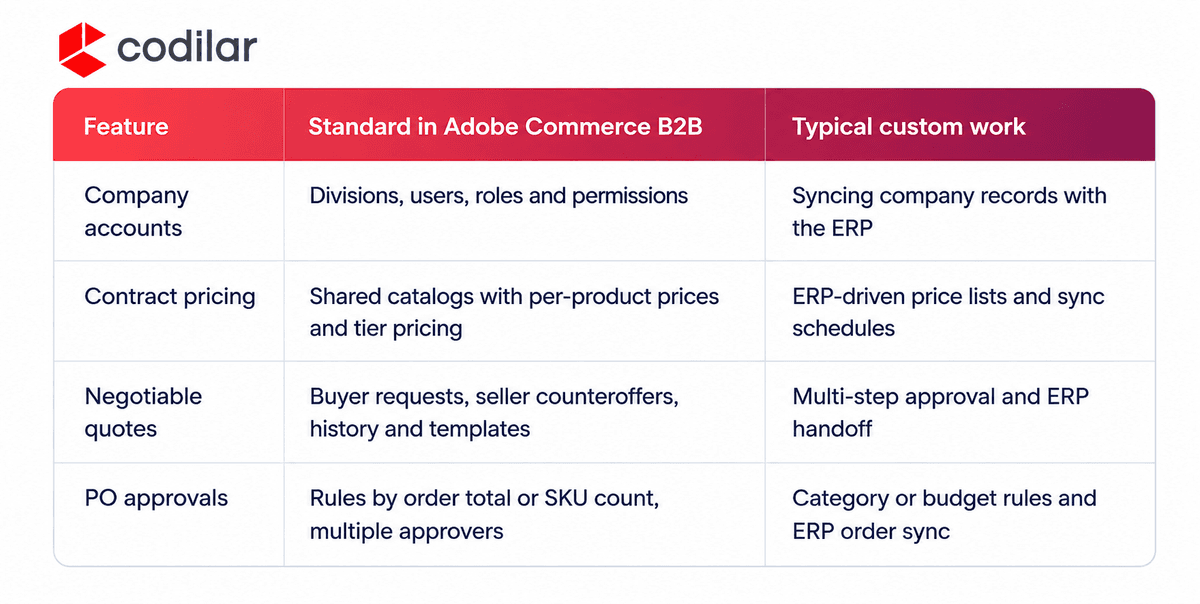
The development work starts at the connection to your ERP. Company records and their parent and child relationships usually begin there, so the two systems need to stay in step.
Contract pricing is done using shared catalogs. Each store has 1 public catalog and then additional catalogs can be created for each company. When a buyer logs in they will only see the products and prices that have been agreed upon. The price can be set as a fixed amount or a percentage discount. Tier pricing can also be applied.
Most likely your contract pricing will be held within your ERP system. If you then enter these prices into Adobe Commerce they will cause a discrepancy between the systems. To get around this, we recommend linking your Adobe Commerce with your ERP system.
The ERP can act as your price list of records and any changes will be pushed through to the store. Depending on how often your prices change you can schedule your sync to occur. If you’re a distributor and your prices fluctuate daily, you will need to update frequently. Whereas, if you’re a manufacturer and your contracts are renewed quarterly, you can perform batch updates.
Negotiable quotes let a company buyer and your sales team agree on a price inside the store, before the order is placed.
A buyer with the right permissions adds products to the cart and submits it as a quote request, with a comment on the terms they want. Your sales rep reviews it in the admin and can change quantities, apply a discount, adjust shipping and add notes or attachments before sending it back. The buyer accepts or counters, and the full history of comments and attachments stays in one place. Once the quote is accepted, it becomes an order. For recurring purchases, quote templates let buyers reuse negotiated terms.
Set expiry dates and designated approvers for all quotes, or high-value requests will drift back into email. Multi-step approvals and quote-to-ERP transfers are usually bespoke work.
All purchase orders will be held awaiting approval by the right people once purchase orders have been enabled within your company. For example, if a technician submits a $400 order and a plant manager submits a $14,000 purchase order, the first purchase order can be allowed through using a rule for order total, whilst the second can be held. Similarly for large mixed purchase orders a rule can be created for the number of SKUs.
If an order has 2 rules then both approvals must be done. This provides your customers with controls on their spend but the purchase orders will have comments and an approval history. This allows large accounts to continue placing orders online.
Sometimes there may be specific requirements. If you need approval based on the product category or cost center budget, this will typically require bespoke development. Syncing approved purchase orders to the ERP will also require bespoke development.
Also read our blog on the Top 14 B2B Features of Adobe Commerce.
Most of the custom work sits where Adobe Commerce meets your back office.
Adobe Commerce ERP integration decides whether the rest works. Pricing, credit, stock and orders all depend on clean data moving between the two systems. Agree on which system owns each record before you configure a feature. Then start with a limited group of accounts and then expand.
Very rarely a B2B store is launched in its entirety. Then, as soon as your customers place their first order, you may need to make changes to rules and pricing.
Choose an Adobe Commerce B2B development company in the USA that has experience in integrating Adobe Commerce with an ERP like yours. As an Adobe Gold Solution Partner, we have integrated Adobe Commerce with multiple different ERPs.
When building your store, the buying rules are mapped out first to ensure that everything is configured or built correctly. Security has to be considered at checkout. With a B2B store there will be lots of buyers’ details to protect in your accounts and orders. Adobe Commerce does provide security to encrypt payment keys, but there is still more that can be done to secure customer details.
This is why we created the PII Shield. The product uses field level encryption on any personally identifiable information from customers, orders, invoices and shipments. This means that even if those fields were exposed they would be inaccessible. Whilst still allowing for a normal checkout and admin experience.
Adobe Commerce provides the account management, pricing, negotiation, and approval features that you and every B2B buyer demand. This can help you deliver real value by providing accurate representations of real accounts and contracts, and clean data from your ERP.
Planning an Adobe Commerce B2B build and wondering where to start? Talk to our commerce engineers today!
No. B2B functionality such as company accounts, common catalogues, quoting and PO approvals are included with Adobe Commerce. Open Source stores will require additional extensions or custom development.
Yes. Adobe Commerce provides REST and GraphQL APIs to allow integration, which would commonly be achieved with middleware or custom integrations to get with an ERP like SAP/NetSuite. We recommend scoping out first.
Approval rules can be based on the total order value or the quantity of SKUs within an order. If there are multiple rules, you will need all the necessary approvals. Additional rules would normally require some custom development.
Yes. This allows you to have B2B functionality like company accounts and common catalogues whilst having a standard consumer store. This is ideal for manufacturers selling to their dealers on agreed terms but also selling directly to buyers.
This will depend on your requirements. Most Adobe Commerce implementations are between 3-6 months. If there is a lot of integration with an ERP, this will increase. We recommend starting with a small group of customer accounts with real pricing and approval rules and scaling out to your full customer base.

Get tailored technology solutions to scale your retail business online
Request A Quote

Stay ahead with insights, trends, and brand success stories from the world of Digital Commerce.


With the world's leading digital commerce agency.